Welcome! Here are the website rules, as well as some tips for using this forum.
Click here to Find a Contractor in your area.
If our community has helped you, please consider making a contribution to support this website. Thanks!
Need Wireless Thermostats hooked up to a zone valve controller

Hello,
I'm trying to find what set up to use for setting up wireless thermostats (2) to some sort of interface that would hook up to my 2 Taco Zone sentry's. There is no easy way of pulling wire or I would just do that.
I've been looking through the honeywell HZ322 and HZ432 Schematics and I'm a bit confused… The unit is a NTI VM110 and does not have a fan center…
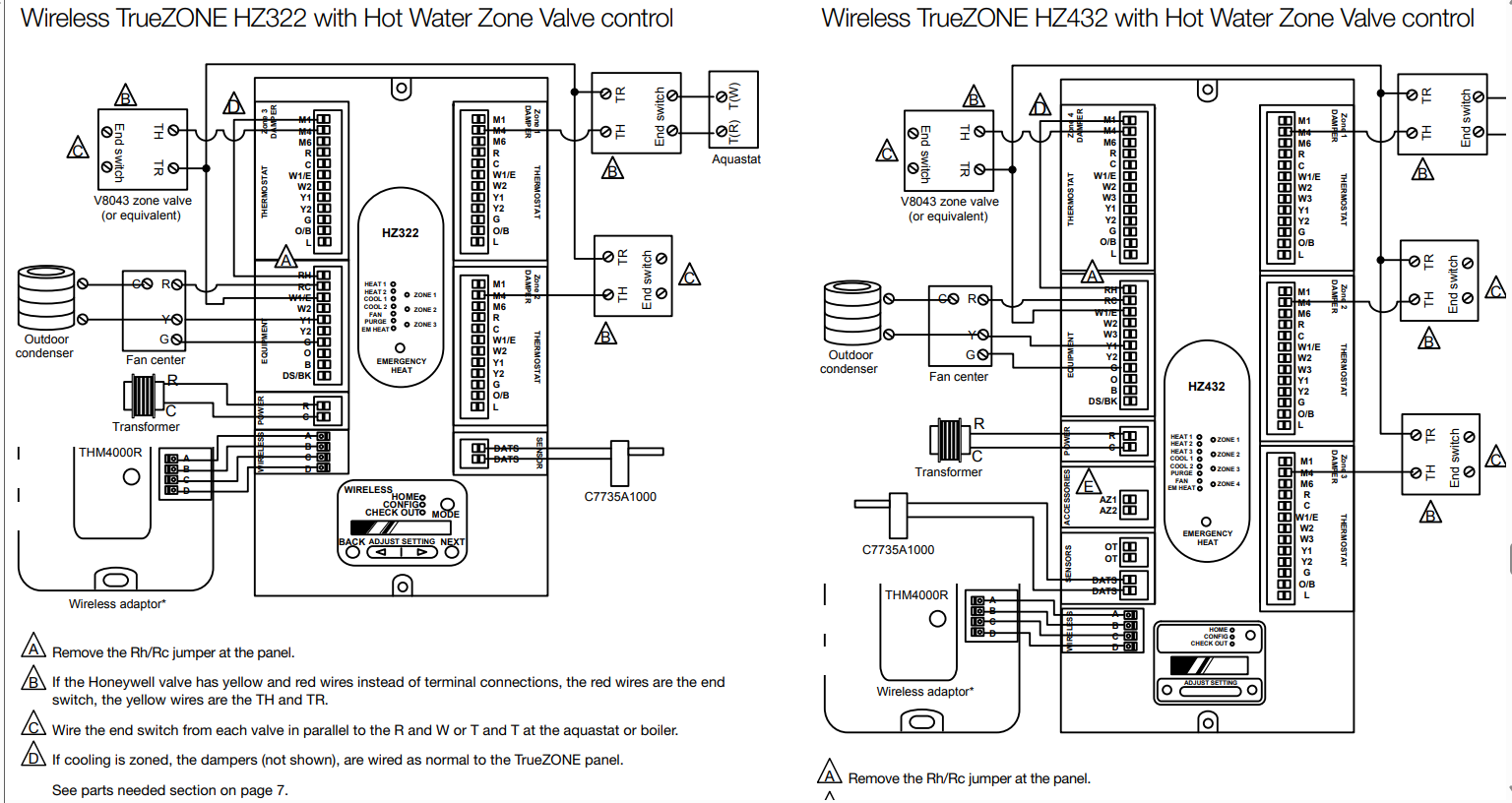
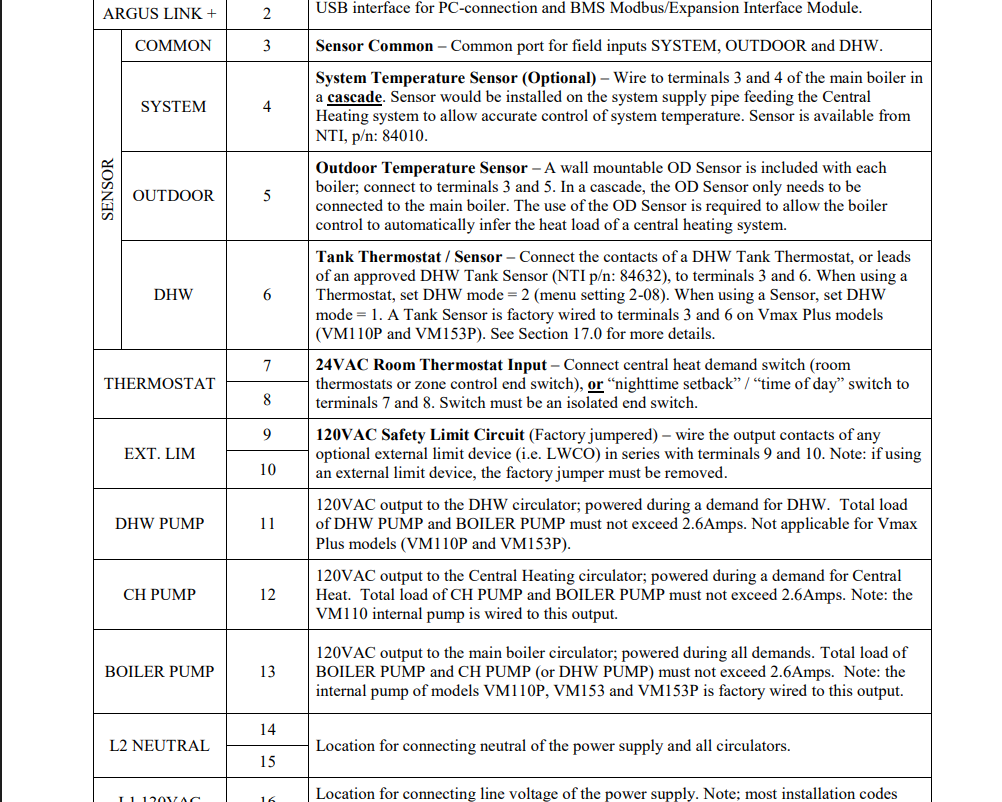
I called Honeywell the support was a bust…
I called Taco tech support for any recommendations and there was no clear answer.
Any suggestions would be extremely helpful, I have been down this rabbit hole on and off the last few days with no avail.
Thanks in advance
Comments
-
Never used these controls and looking at them is giving me a migraine LOL.
I think you could run a lot of wire for what they cost.
The Honeywell instructions are for furnaces air conditioners and heat pumps etc not boiler or zone valves.
You are correct about Honeywell tech support they won't talk to contractors or homeowners only their Honeywell distributors.
I think the control you're looking at is $$$ and has all kinds of stuff you may not need.
Take a look at this control. I don't know if they are any good but less $$$ and straightforward to hook up.
Others will post with other opinions
1 -
the honeywell is labeled for force air, you need to translate from zone damper to zone valve.
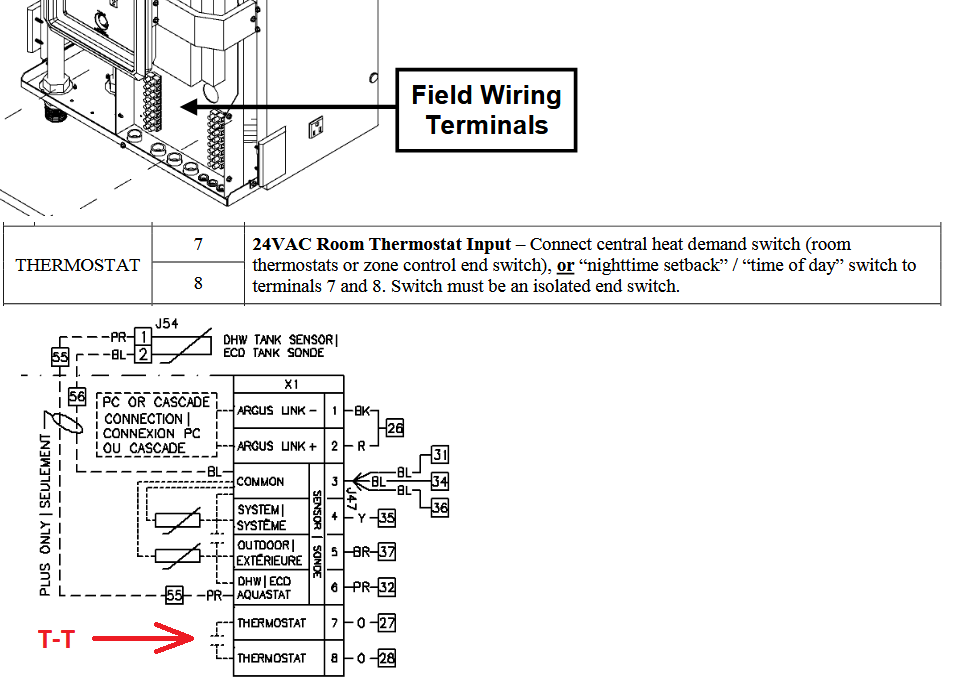
the fan center is t-t or x-x on your boiler, you only need w and r, g and y are for ac.
you could also drive the heat call at the boiler off of the paralleled end switches instead of off of the wireless t-stat receiver/zone controller.
0 -
Honeywell/Resideo is making a lot of changes with the RedLink line.
A wireless thermostat was TH5320R1002 with the THM5320R1000 EIM. I don't know if its still offered. A 24 vac transformer should already be there to power the zone valves. I don't know what the va rating is on the interfaces, but I would check first.
0 -
Use one of these kits per zone:
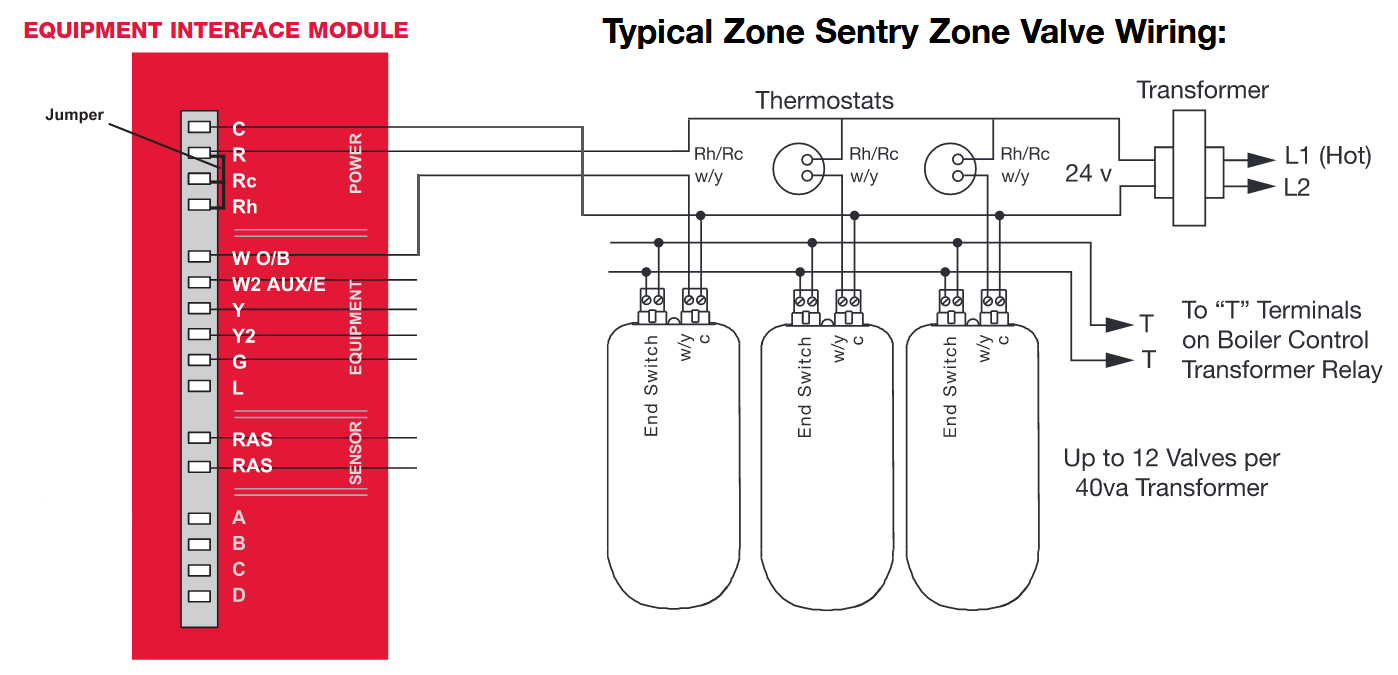
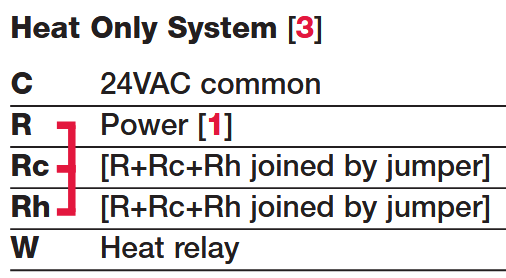
Wire 24 volts (available on the control) to "C" and "R", "Rh" and "W" to T-T on the pump or zone valve control.
I don't have any experience with the Braeburn thermostat which communicates using a 433 MHz radio frequency while Honeywell uses a 900 MHz signal. I've used many of the Honeywell ones and they have been very stable, especially in large homes with plaster walls.
8.33 lbs./gal. x 60 min./hr. x 20°ΔT = 10,000 BTU's/hour
Two btu per sq ft for degree difference for a slab1 -
Can you tell me which wireless thermostat you already have? You showed a RedLINK wireless thermostat in your original post. Is that the thermostat you currently have?
Can you take a picture of the thermostat and the subbase attached to the wall? Is there a model number on the thermostat?
You also referenced Honeywell HZ322 and HZ432 schematics in your original post. Which components do you already have? Do you have the actual zone panel, the thermostat interface, and the thermostats? As I understand it, you need all three components for each wireless thermostat.
- Two thermostats, one for each zone
Two wireless interface controls, one for each zoneCorrection:- One wireless interface for the system
- One zone control panel for the system.
Here is how you will set it up:
The THM4000R itself does not decide which thermostat controls which zone valve. The HZ322 assigns each wireless thermostat to Zone 1, Zone 2, or Zone 3 during enrollment.
Here is the sequence:
- Wire the THM4000R to the HZ322’s A-B-C-D terminals.
- Enter the HZ322 Configuration menu.
- Set RF Enabled = Yes.
- For each zone that will use a wireless thermostat, set:
- Zone 1 TSTAT Type = RF
- Zone 2 TSTAT Type = RF
- Zone 3 TSTAT Type = RF, as applicable.
- Save the configuration.
- Press the HZ322 Mode button until the Wireless LED is lit.
- Press Next to begin adding devices.
- When the display alternates between Press Connect and Exit, place the thermostat into its RedLINK connection mode or press its Connect button, depending on the thermostat model.
The important part is the order in which you enroll them:
- The first thermostat enrolled for the first RF zone becomes Zone 1.
- The next thermostat becomes Zone 2.
- The third becomes Zone 3.
The HZ322 then associates that thermostat’s calls with the zone valve wired to the matching damper terminals:
- Zone 1 thermostat → Zone 1 valve terminals
- Zone 2 thermostat → Zone 2 valve terminals
- Zone 3 thermostat → Zone 3 valve terminals
After enrollment, use the HZ322 Checkout mode. The panel lets you test each zone valve individually and then view the thermostat inputs for Zone 1, Zone 2, and Zone 3. That is the best way to confirm that each thermostat is operating the intended valve
I would label each thermostat before enrolling it—Zone 1, Zone 2, Zone 3—and connect them one at a time. Do not place all thermostats in connection mode simultaneously, because that can make it difficult to know which one was assigned to which zone.
Diagram to followEdward Young Retired
After you make that expensive repair and you still have the same problem, What will you check next?
1 -
I have worked with the HZ322 panels before, however I have never worked with the wireless thermostats, so this may not be accurate. This is the best guess for your situation if in fact you have the following components
- Two RedLink thermostats
- One HZ322 Panel
- One wireless interface THM4000R
- NTI Boiler
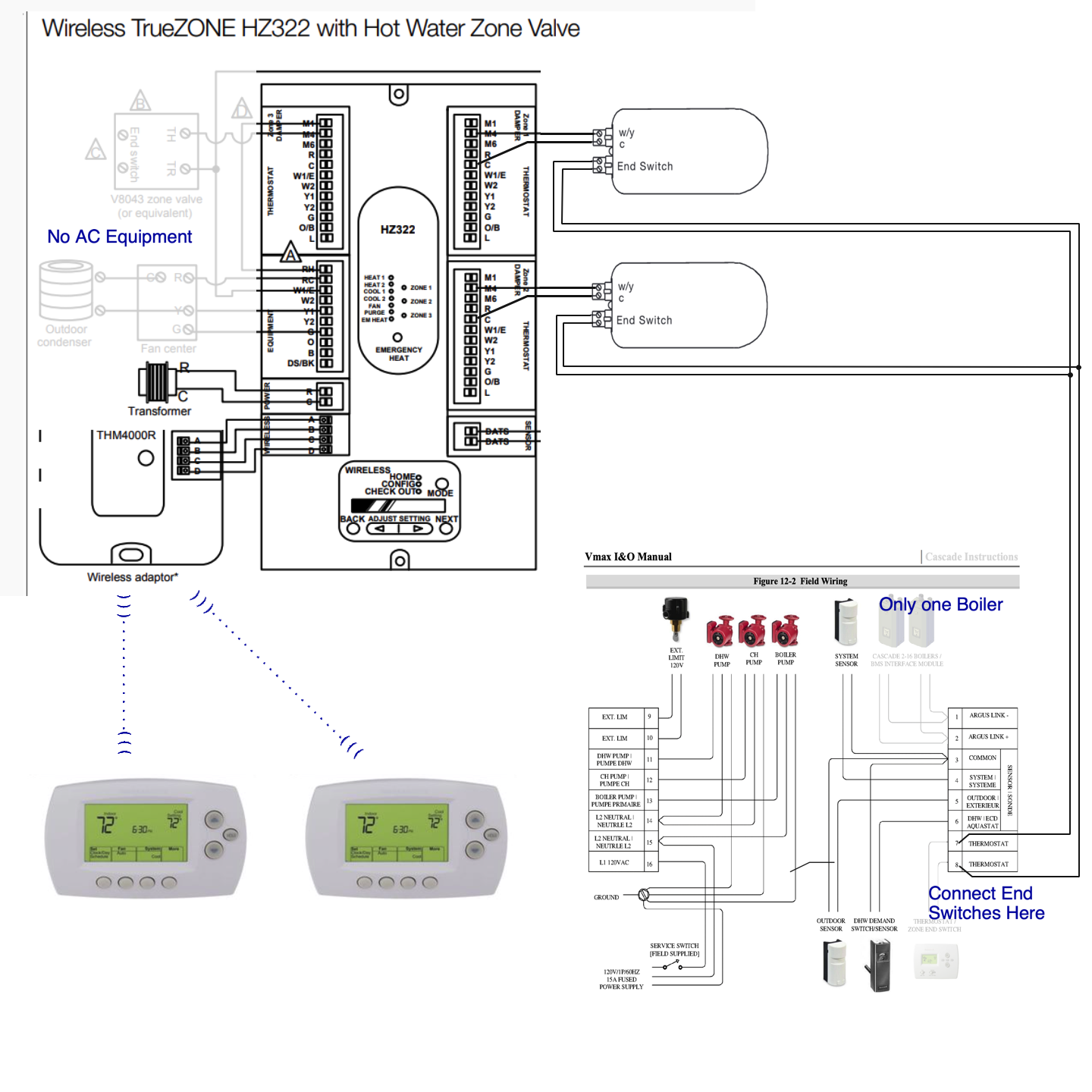
- Upper Left is the HZ322 panel. (over-kill but workable)
- Upper Right. Taco Zone Sentry Valves. End switch to the NTI boiler
- Lower Right. NTI boiler. The end switch of the zone valve will connect to 7 & 8 on the boiler control panel
- Lower Left. Add the wireless thermostats per the instructions
If this does not work for you then we can look at other options. But I believe this is a good start based on what you have on hand.
Edward Young Retired
After you make that expensive repair and you still have the same problem, What will you check next?
0 -
Similar to @EdTheHeaterMan solution. IMO Honeywell documentation can be a bit pathetic.
 National - U.S. Gas Boiler 45+ Years Old
Steam 300 SQ. FT. - EDR 347
One Pipe System0 -
"Need Wireless Thermostats hooked up to a zone valve controller"
Are you actually planning on using a Zone Valve Controller also ?

I would not consider the HZ322 a zone valve controller. They have other features.
National - U.S. Gas Boiler 45+ Years Old
Steam 300 SQ. FT. - EDR 347
One Pipe System 1
1 -
If you have not purchased anything yet two of @EBEBRATT-Ed's Braeburn 8500 (or the like) solution and a 120 to 24 VAC transformer may be the best cost effective method, the wiring is similar to what was posted above. You really don't need a zone valve controller but they do provide some nice features.
National - U.S. Gas Boiler 45+ Years Old
Steam 300 SQ. FT. - EDR 347
One Pipe System1 -
does the braeburn have a way for 2 of them to coexist in the same space?
0 -
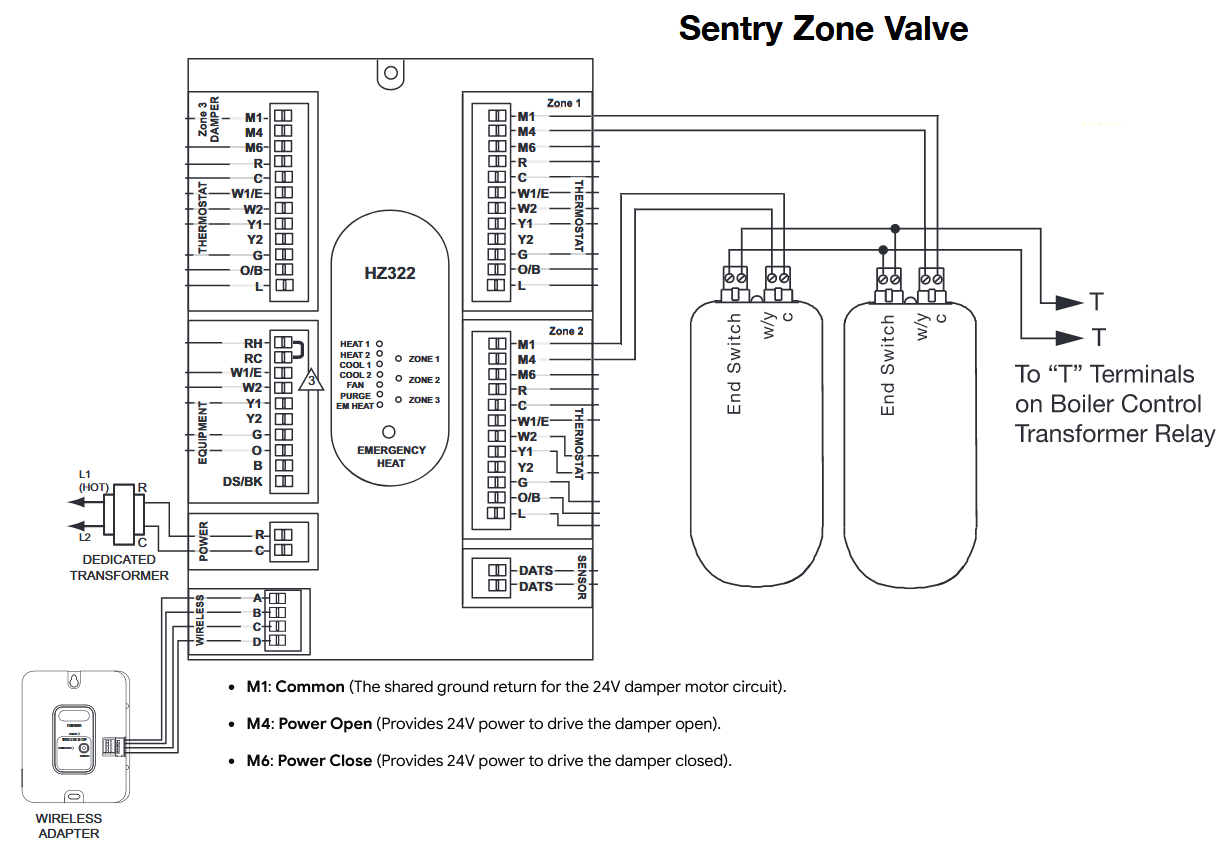
If you have already purchased the components and connected wires to them, you probably cannot return them. That said, my four-part diagram above will work for your situation. You can use the modifications that @109A_5 suggested .
Connect the zone-valve motor to M1 and M4, or to C and M4.
I find that many terminals used to connect the various loads to the transformer’s C terminal are internally connected through the printed circuit board. Therefore, M1 and C on each zone may all be connected together and also connected to C on the 24 VAC transformer. kind of like this:
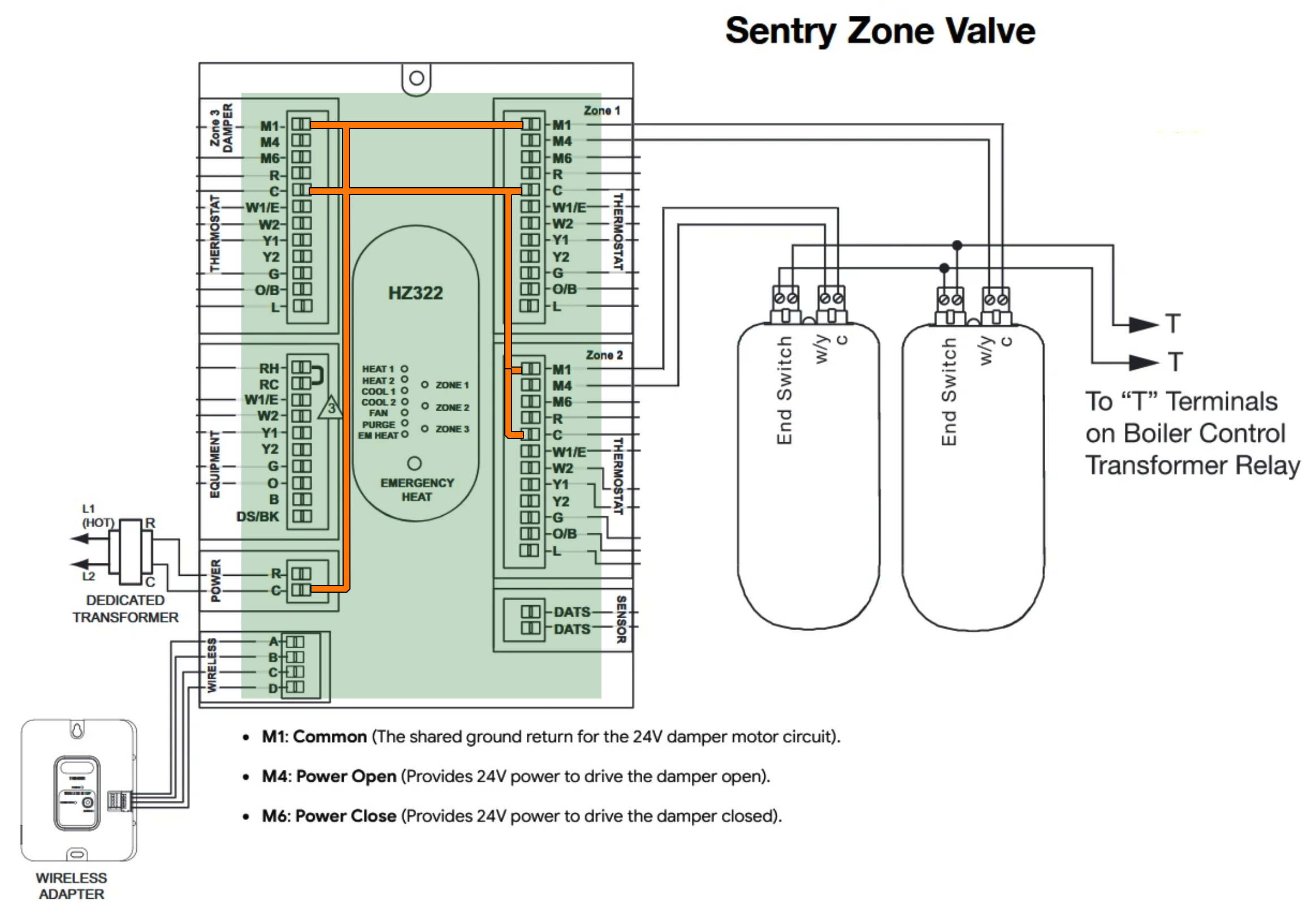
This is not an exact representation of the printed circuit connecting the transformer’s C terminal to all of the common terminals. It is simply an illustration intended to clarify the statement.
Edward Young Retired
After you make that expensive repair and you still have the same problem, What will you check next?
 2
2 -
that might actually be a much better option for power open/power close or normally open zone valves instead of the relays kludged in to hydronic zone panels you usually see.
0 -
Thank you guys for the great information and the beautiful diagrams. I have thoroughly looked over everything and believe this will work out great. The clarification is greatly appreciated, I was lost with all the crazy diagrams from honeywell. If this system goes in I will defiantly leave feed back, if not I will keep it in my pocket for the next one. Thanks again!
1






Categories
- All Categories
- 87.8K THE MAIN WALL
- 3.3K A-C, Heat Pumps & Refrigeration
- 60 Biomass
- 430 Carbon Monoxide Awareness
- 133 Chimneys & Flues
- 2.2K Domestic Hot Water
- 6K Gas Heating
- 124 Geothermal
- 170 Indoor-Air Quality
- 3.9K Oil Heating
- 79 Pipe Deterioration
- 1.1K Plumbing
- 6.7K Radiant Heating
- 397 Solar
- 16.1K Strictly Steam
- 3.5K Thermostats and Controls
- 56 Water Quality
- 51 Industry Classes
- 51 Job Opportunities
- 18 Recall Announcements