Welcome! Here are the website rules, as well as some tips for using this forum.
Click here to Find a Contractor in your area.
If our community has helped you, please consider making a contribution to support this website. Thanks!
Honeywell Vision Pro issue

Hey guys,
I have a lot of Honeywell Vision Pro TH6220WF2006 thermostats on Bard wall mounted units. Single stage cooling, single stage electric heat.
The t-stats are set in Auto mode (ISU#300. 1)
If the most recent mode has been cool and then the temperatures drop, the thermostats are not switching to heat mode. I have to manually go to each room and put them from Auto to Heat in order for heat to engage.
The ISU setting #303 is at 0F. I don't see anything else in the ISU menu that would help me.
Anybody else encounter this issue.? It's causing a lot of issues with management and I don't have an answer to give them.
Appreciate any help.
Garrett.
Comments
-
You don't want the heat setpoint and the cool setpoint to be too close together. that will waste energy. At least 4° difference is common. 68° for heat and 72° for cooling.
Let me review the info in the ISU and see what I can find for you.
Edward Young Retired
After you make that expensive repair and you still have the same problem, What will you check next?
0 -
Ok this may seem obvious but one of the reasons that the auto changeover might not happen as you expect is that the set point on the thermostat may be set too far apart. For example, last spring, the person who last used that space didn't want the heat operating so they turned the thermostat set point to 55° rather than turn it to Mode Off. Once the summer weather required the cooling system to operate, that low setpoint was never checked and is still at 55°. If the room is above 55° now, then the heat will not operate.
Is this problem happening on all your thermostats? Or only one or two of them?
Edward Young Retired
After you make that expensive repair and you still have the same problem, What will you check next?
0 -
I've had some strange issues with Honeywell stats over the years, maybe see if you can do a factory reset & reconfigure it. That part number is the Wi-Fi version, is someone 'helping out' with the app?
0 -
The problem is on all t-stats.
Setppoints are programmed 68/72 during office hours, 64/76 evenings and nights.
Wi fi is not setup.
0 -
How many thermostats are we talking about? And the same thing happened to all of them at the same time? I'd say either there was an electrical occurrence that only affected the thermistors in the thermostats, or the diabolical minds at Resideo set an internal timer on all thermostats to fault so you'll upgrade to the new S1200. It dices, it slices, it connects to your Ring doorbell, it ties your shoes, and it can even core an apple.
 1
-
I have 13 in one building and 10 in the building next door. It seems to be on all thermostats.
I don't think it's a time delay.
0 -
Your using residential controls in a commercial set up. Look into BMS control system. That will give you more options.
0 -
Double check the configuration, is it set up for conventional, 1H1C, electric? Are the wires landed on the correct terminals, conventional not HP?
If they're all doing the same thing, it's gotta be one of those two.
Even Resideo wouldn't ship a stat that doesn't work.Ummm, nevermind. Try tech support if everything looks correct. I've never changed ISU 303.Say, what is the temp at when you end up manually setting the mode to heat?
 1
-
BMS is not an option at this point. Wiring and Thermostat configurations are correct..
Temp can be a low as 64F but heat does not engage, even with heat setpoint of 68F Once I switch mode from Auto to Heat it comes on.
0 -
are all thermostats calling for heat?
0 -
IIRC that thermostat will show "Heat On" on the screen when it's actually calling, or flashing if it's configured as a heat pump and the anti-short-cycle timers are running.
It's hard to guess without seeing it, I still think you need to check it it's set up as a heat pump or not, and if the wires are landed on the conventional designated terminals or the HP designated terminals. There is some overlap (W - O/B, W2 - AUX), and switching it to heat may make it decide to energize another contact.
0 -
Not sure what exactly you mean by that pecmsg.
If I put the thermostats in Heat mode, then the units work fine in that mode. The same applies to Cool mode. No issues.
It's when they are in Auto mode. With setpoints of 68F and 72F. They do not switch between modes to satisfy the room.
For example: If the weather is warm and the units are cooling normally, but then we get a run of cold nights and mornings, the heat does not come on even though the thermostats are in Auto mode and the room temp is well below the 68F heating setpoint. The heat will only come on if I switch the mode from Auto to Heat mode.
0 -
What is ISU #200 set to?
What is ISU 205 set to?
Is #218 available? If yes then What is ISU #218 set to?
What is ISU #221 set to?
What is ISU #230 set to?
What is ISU #253 set to?
What is ISU #255 set to?
Edward Young Retired
After you make that expensive repair and you still have the same problem, What will you check next?
0 -
Hi Ed,
200- 1. conventional forced air heat
205- 4. electric forced air
218. N/A not a heat pump
221. Heat stage 1. Backup heat 0
230. 2.thermostat controls controls fan
253. 0.
255. 1. (But there is no backup heat)
0 -
so these are 10 individual systems nothing in common between them
0 -
Exactly. All units are independent standalone.
0 -
I just spoke to a tech support guy at Residio. He's at a loss as to why this is happening.
He's going to kick it around the office with his colleagues and see what they come up with.
0 -
In the mean time I'll double check my wiring. I'm pretty sure everything is good though in that regards.
When I put them in heat mode then heat works fine. The same with cool mode. So the stats are not configured for heat pump by mistake.
It's just Auto mode that is the issue.
0 -
So we're clear, all these thermostats were fine in auto changeover for X amount of time until one fine day all 23 (TWENTY-THREE!) thermostats would not function in auto mode. Gremlins?
When this happens, the display still shows auto mode and room temperature is below setpoint in heating? So even though the thermostat shows that it should be switching, its doing nada.
Does all the HVAC equipment go to the same electrical panel? No because two buildings? Are both buildings running off the same meter? Nothing else in the buildings has been affected? Is this a prank call?
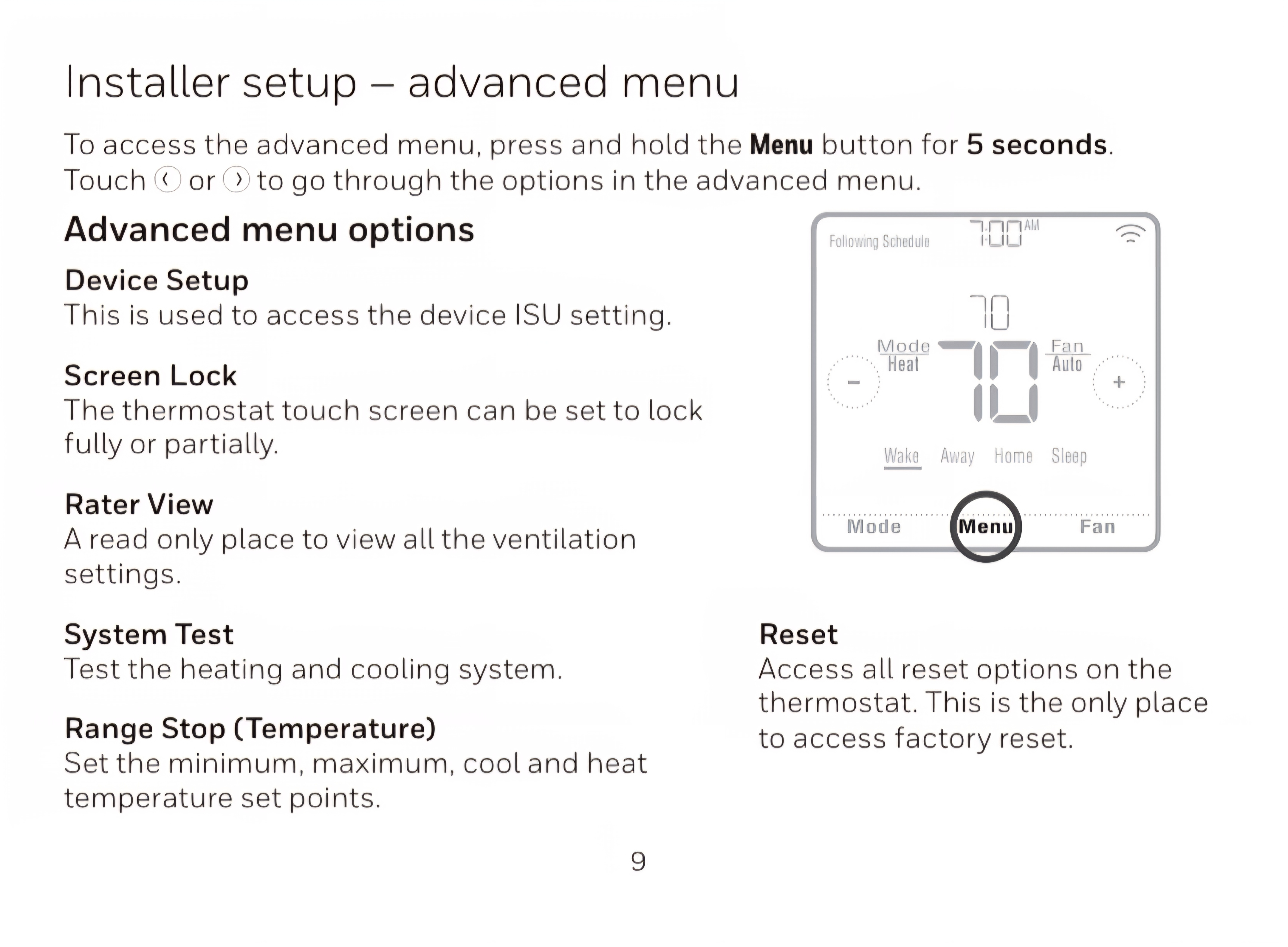
I would try a factory reset on one and see if it corrects after you reconfigure the settings. If it works, only 22 (TWENTY-TWO!) more to go.
0 -
Something’s not right, doesn’t pass the sniff test!
0 -
The thermostats were installed this spring. This is the first fall that we've had with these thermostats- warm afternoons and cold mornings.
It's not happening on all of them I don't think, but quite a lot of them. They are all configured the same way. It's a real head scratcher. That's why I reached out.
0 -
Interesting and confounding. Perhaps a different thermostat would be a better choice. I would try something else on one of the systems and see if it works as you desire. Then if it works , replace the rest of them and return the defective ones to the supplier as a warranty failure to get your money back.
The instructions indicate that AUTO will work a designed way and it does not. That is a factory defect. That is covered under the warranty. You should ask for a labor allowance (which you probably won't get but you can ask)
Edward Young Retired
After you make that expensive repair and you still have the same problem, What will you check next?
0 -
What happens if you change 303 to 2 instead of 0?
Single pipe 392sqft system with an EG-40 rated for 325sqft and it's silent and balanced at all times.
0 -
302 to 2? Not sure. I'll try, Let's see what the guys at Honeywell come back with.
0


Categories
- All Categories
- 87.9K THE MAIN WALL
- 3.3K A-C, Heat Pumps & Refrigeration
- 60 Biomass
- 430 Carbon Monoxide Awareness
- 135 Chimneys & Flues
- 2.2K Domestic Hot Water
- 6K Gas Heating
- 124 Geothermal
- 170 Indoor-Air Quality
- 3.9K Oil Heating
- 80 Pipe Deterioration
- 1.1K Plumbing
- 6.7K Radiant Heating
- 397 Solar
- 16.2K Strictly Steam
- 3.5K Thermostats and Controls
- 56 Water Quality
- 52 Industry Classes
- 51 Job Opportunities
- 18 Recall Announcements